
Hey music lovers! Got a track that makes you want to move? With PowerBeatsVR, you can turn supported local music files into a workout, then choose the difficulty and movement mix. You don’t have to wait for somebody else to make a map for your song.
Other VR apps approach custom music differently. Let’s look at those workflows so you can choose the one that fits the way you want to play.
Your song, your starting point
In PowerBeatsVR, open the LOCAL tab, browse to a supported song and choose your generation settings. The game builds a workout layout from the file. You can adjust the movement categories and difficulty, then use the editor if you’d like more control over the result.
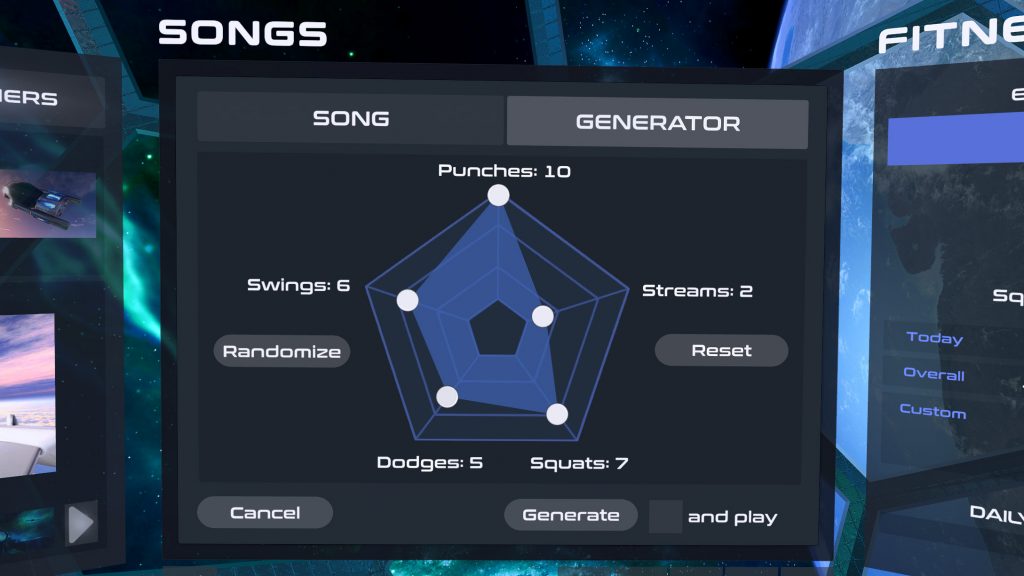
For a first try, choose a familiar song with a clear beat and comfortable settings. Play it, notice how the timing and movement feel, and change one setting at a time. That gives you room to learn what you enjoy without turning the first session into an editing project.
Our music FAQ covers file formats, transfer steps, permissions and beat adjustments. MP3 is a practical first choice across the supported platforms. PC, Quest and PS5 have different format lists and loading instructions, so follow the section for your device.
Generation, community maps and choreography
| Workflow | What you bring | Where the movements come from |
|---|---|---|
| PowerBeatsVR generator | A supported local audio file and your settings | The game generates a workout layout |
| Community map | Audio plus a compatible authored map | A creator has designed the movement |
| Choreography/editor tools | Audio and your own editing work | You build or refine the sequence |
A generated workout gets your music into play quickly. An authored map lets a creator fine-tune a particular sequence. Both have their appeal; the useful question is whether you want to start with generation or seek out specific choreography.
Other music-led options to explore
Synth Riders offers flowing, dance-like movement and custom-content options on supported versions. Check its current platform instructions before buying for a community music library; a PlayStation release doesn’t automatically include the same imports as Quest or PC.
Beat Saber’s official tracks and paid packs are separate from community mods. Third-party custom-song tools depend on the platform and game version and can require maintenance after updates.
Audio Trip focuses on choreographed dance and offers choreography tools. That is a different creative process from automatic workout generation.
Get the file ready before the headset goes on
Use music you own or have permission to use. Streaming-service offline downloads generally aren’t ordinary MP3 files you can browse to and import. Sharing a workout layout also doesn’t grant permission to redistribute its song.
For your first PowerBeatsVR import:
- Check that a local MP3 plays correctly outside the app.
- Put it in an accessible folder on your device.
- Grant the requested file access and find it in LOCAL.
- Start with a comfortable difficulty and movement mix.
- Adjust timing or layout settings if needed, using the FAQ.
Found a track you love working out to? Come share the song title with us on Discord. We’d love to hear what makes your playlist personal.
If you would rather build the session around a playlist you already love, take a look at PowerBeatsVR on Quest or Steam.
See you in VR,
Team PowerBeatsVR
Header artwork is an AI-generated editorial illustration. In-article images are actual archived PowerBeatsVR captures.